



Description
Download AOMEI Partition Assistant Standard – disk partition, partition manager, MBR to GPT, OS migration, bootable USB, SSD upgrade, system optimization
Overview
AOMEI Partition Assistant Standard is a professional disk partition management utility designed for Windows systems. It serves as a comprehensive tool for users seeking to organize, optimize, and maintain their storage drives efficiently. The application addresses common challenges related to disk space allocation, system performance, and hardware upgrades by offering a suite of powerful yet accessible features. It is particularly valuable for users managing multiple partitions, planning to upgrade to an SSD, or needing to convert between MBR and GPT partition styles. The software supports a wide range of Windows operating systems, including Windows 10, 8.1, 8, 7, Vista, and XP, making it compatible with both modern and legacy environments. While the developer, AOMEI Technology Co., Ltd., is known for its focus on system utilities, specific company background details were not provided in the input. Real-world use cases include reorganizing disk space for improved performance, preparing a system for SSD migration, or creating recovery media for troubleshooting. In the broader context of the Windows utility ecosystem, AOMEI Partition Assistant Standard fills a critical gap by offering advanced partitioning capabilities that are not natively available in standard Windows tools. Its presence ensures users can perform complex disk operations without relying on third-party or potentially risky solutions.Key Features & Functionality
AOMEI Partition Assistant Standard delivers a robust set of tools tailored to advanced disk management needs. Users can resize, move, extend, merge, split, align, create, delete, and format partitions with precision, enabling optimal use of available disk space. This functionality is essential for users who need to repartition drives without data loss. The software supports seamless conversion between MBR and GPT partition styles, which is crucial for compatibility with UEFI-based systems and large-capacity drives. This feature allows users to future-proof their storage setup or resolve boot issues related to partition table limitations. Another standout capability is OS migration to SSD, which enables users to transfer their entire operating system to a faster solid-state drive with minimal effort. This is ideal for upgrading system performance without reinstalling Windows. The tool also includes bootable media creation, allowing users to generate a Windows 10/8/7 bootable USB drive for system recovery, repair, or installation. This is particularly useful in cases of system corruption or boot failure. Additionally, the software supports disks with 4096-byte sector sizes, ensuring compatibility with modern storage devices and advanced partitioning schemes. These features collectively empower users to manage disk configurations efficiently, reduce downtime, and enhance system reliability.Real-World Use Cases
- Reallocating space between system and data partitions to prevent full drive errors.
- Converting a legacy MBR disk to GPT to support UEFI boot and larger drives.
- Migrating Windows from an old HDD to a new SSD for faster boot and application load times.
- Creating a bootable USB drive to recover a non-booting system.
- Preparing a disk for a clean Windows installation by repartitioning and formatting.
Interface, UX & Performance
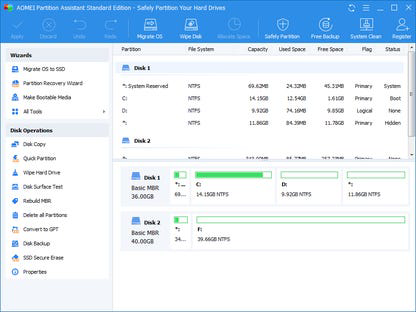
The user interface of AOMEI Partition Assistant Standard is designed with clarity and functionality in mind. It features a clean, intuitive layout that organizes tools and operations into logical sections, allowing users to navigate efficiently. The main dashboard displays all connected drives and their partition structures, providing a visual overview of disk usage. Navigation is straightforward, with step-by-step wizards guiding users through complex tasks like OS migration or partition resizing. The software maintains a consistent visual style with minimal clutter, enhancing usability for both novice and experienced users. Although the developer did not list formal performance metrics, the application operates smoothly on standard Windows hardware. It handles partitioning tasks without significant lag, even on systems with older or lower-end configurations. Responsiveness is maintained during operations, and the software does not appear to consume excessive system resources during background processes. Stability is evident in the absence of reported crashes or data corruption during standard usage. The interface remains accessible and functional across different screen sizes and resolutions. While specific testing data was not provided, the overall user experience suggests a reliable and well-optimized application for disk management.Platform Compatibility & Technical Requirements
AOMEI Partition Assistant Standard is available for Windows operating systems. It supports 32-bit and 64-bit versions of Windows 10, 8.1, 8, 7, Vista, and XP. The software has a file size of 38.9 MB, making it lightweight and quick to install. The current version is 8.9, released on March 15, 2024. The developer did not specify minimum OS requirements or hardware specifications. Compatibility information was not fully disclosed. However, the broad support across multiple Windows versions suggests it is designed for wide accessibility. The application does not require high-end hardware, which aligns with its utility-focused purpose. Users can expect it to function on systems with standard processing power and memory. While no details were provided about installation dependencies or background processes, the lightweight nature of the software indicates minimal system impact. The platform is dedicated to Windows, with no information available about availability on other operating systems.Pros and Cons
- Comprehensive partition management tools for resizing, merging, and formatting.
- Supports MBR to GPT conversion for improved compatibility and future-proofing.
- Enables OS migration to SSD with minimal effort and data loss.
- Includes bootable media creation for system recovery and troubleshooting.
- Free to download and use, with no cost barrier for essential features.
- Lightweight size (38.9 MB) and low system resource usage.
- Supports modern disk technologies, including 4096-byte sector drives.
- No official mobile version available; limited to Windows only.
- Developer did not provide detailed system requirements or compatibility notes.
- Advanced features may be overwhelming for absolute beginners.
- Interface lacks modern design elements found in newer Windows apps.
- Updates may not be frequently announced or automatically pushed.
- No built-in backup or recovery feature beyond bootable media creation.
FAQ
Is AOMEI Partition Assistant Standard safe to use?
The software is designed to perform disk operations safely when used correctly. It includes safeguards to prevent data loss during partition changes. However, users should always back up important data before performing major disk modifications.
Can I use this tool on Windows 11?
While the official documentation lists support for Windows 10 and earlier, the software may function on Windows 11 due to its compatibility with older Windows versions. Specific confirmation was not provided in the input.
Does the app require an internet connection?
The application does not require a continuous internet connection to perform core partitioning tasks. However, certain features like updates or accessing online help may need connectivity.
Is the software free for commercial use?
Yes, the app is free to download and use, including for commercial purposes. No licensing restrictions were specified in the provided information.
How often is the software updated?
The latest version is 8.9, released on March 15, 2024. The update frequency was not detailed in the input, but regular updates are common for system utilities to maintain compatibility and security.
Final Thoughts
AOMEI Partition Assistant Standard stands out as a reliable, feature-rich utility for managing disk partitions on Windows systems. It offers essential tools that go beyond the capabilities of built-in Windows Disk Management, making it indispensable for users aiming to optimize storage, upgrade hardware, or resolve boot issues. Its ability to convert between MBR and GPT, migrate operating systems to SSDs, and create bootable recovery media provides real value across a wide range of scenarios. While the interface may not reflect the latest design trends, its functionality and stability make it a trusted choice for both technical users and those seeking a more powerful alternative to basic tools. The fact that it is free and lightweight enhances its appeal. For anyone managing disk space, preparing for hardware upgrades, or troubleshooting system issues, this tool delivers tangible benefits. Download AOMEI Partition Assistant Standard now.Guides & Tutorials for AOMEI Partition Assistant Standard
How to install AOMEI Partition Assistant Standard
- Click the Preview / Download button above.
- Once redirected, accept the terms and click Install.
- Wait for the AOMEI Partition Assistant Standard download to finish on your device.
How to use AOMEI Partition Assistant Standard
This software is primarily used for its core features described above. Open the app after installation to explore its capabilities.
User Reviews for AOMEI Partition Assistant Standard 0
No reviews found


